It's a long-held belief of mine that teachers work bloody hard. Too hard, very often. Twenty years of practice at chalkface (now the digital interface of course), bags under the eyes and an alarming number of wrinkles I swear never used to be there can help me attest to this fact from personal experience. Whether all of this work is always efficient, effective, or indeed has ANY effect on my students' learning may well be a matter for debate, but not in this post. In this half-term post, I want to come back to an idea I've out out a while ago, namely how teachers can remain healthy. As part of our appraisal systems this year, we've been asked to write down the number of days of absence we had last year, and I found that these stats had all been pre-compiled for me. The nice surprise in this otherwise fairly worrying surveillance trend was to find out that this year marks 5 years (and here I am currently touching enough wood to reconstitute an entire forest!) without illness. In a secondary school as full of snot and lack of hygiene as any teen-dominated environment, I was pretty impressed by this statistic. I try to take care of myself. I try to devote time to myself, my physical and mental well-being, and I will take on anyone who thinks you have to be "pragmatic" about these matters. "Sometimes you've just got to get your nose to the grindstone and get it done Mike, and things like exercise go out of the window for a bit", I'm told. As far as I'm concerned, that's the thin end of the wedge. If you're going to work ridiculous numbers of hours and devote your life to teaching, at the expense often of family and friends, then you'd better be fit enough to do this for the duration, otherwise you WILL drop. I've seen this happen to too many good teachers to doubt my convictions on this one. So half-term has come around again, I have shedloads to do, but I've started the half-term on a positive footing. Every day of this half-term, I will do something for me, something for my family, and something for my spirit. Only I couldn't think of anything. Hence, the quest began to think of activities to get myself off the work treadmill, or rather fit the work around, and between us, my daughter and I have come up with some good ones. I share them here in the hope that a) You will get some inspiration to look after your own health; b) You'll pass on your own recommendations for me: A virtuous circle if you like. Anyway, here goes... Twelve ways to reconnect with yourself this half-term...
1. Watch a good film that inspires you: For this half-term, I've chosen John Favreau's fab performance in Chef: One man's journey from Michelin-starred chef de cuisine to taco-van owner as he rediscovers the roots of his passion for cooking. Don't watch on an empty stomach. 2. Try t'ai chi or yoga. It might be new, it might feel a bit hippy, but try it. I've been doing this since the day I started teacher training, and trust me, it works. Disengage your brain, take time for yourself, take stock of where your body is at. It will thank you later, possibly in old age, possibly by making sure that you're still around to have one! 3. Play cards, or board games: Let's face it, the cards are just an excuse for a good conversation with the whole family, a drink, some nibbles. Play Top Trumps if you like. Nobody cares. Just enjoy each other's company, and laugh. 4. Read something for pleasure, not work. Read something to give you a new perspective. My personal recommendation at the moment is The Kite Runner - Great book about Afghanistan, which will help you see that country and culture in a new light. 5. Cook a meal with or for someone you love: Take care over it. Get it perfect. Enjoy the process of making, tasting, rolling, kneading. The eating isn't the only sensual part of the meal. 6. Get to know your own area as you've never quite seen it before by trying geocaching: Free membership, and millions of ready-made treasure hunts around your area. 7. Switch the heating on. Go out for a walk in the dark and the wind. Come home. Relax in the warm under a duvet. Reconnect with nature, and then appreciate the modern comforts which seclude you from being at its mercy all the time. 8. Seeing as it's October half-term (I promise I will try and update these every time we have a holiday so that all advice is guaranteed seasonal and organic!), go see a firework display with friends and children. Make an occasion of it. Take some flasks of mulled wine, roast chestnuts etc to share. Better still, make your own bonfire, and learn how to light it without matches. Get those neighbours you never have time to speak to properly round, and enjoy each other's company. 9. Switch off all your electronic devices for 24 hours: Phones, ipads, laptops, TV, the lot. Spend the time listening, to yourself, to your friends, and to your family. See what type of day you had compared to normal. If you're a digital addict like I am, you'll be amazed at how you feel after this one, once the initial frustrations wear off! 10. Get in touch with your creative side: Now that the nights have drawn in, go outside and light paint. You need a camera with a long exposure setting, then take a torch or any light source, and draw 11. Do a taste test. Indulge your palette and reconnect to your senses. Wine, chocolate, smoothies, doesn't matter. Make loads, invite people round, and enjoy talking about your senses, including what they make of your weirder concoctions... 12. Go to an independent cinema. Watch an independent film. Watch a British film. Pride is my recommendation this month: A great (true) story about the support the LGBT community gave the striking miners during the mid-80s, and a chance to see Dominic West as a true Dancing Queen.
Hope this gives you some ideas for starters: Please leave me yours in the comments.
I was quaking in my boots a little when OFQUAL published their list of subjects being considered for "reform" (or not!) a few weeks ago. And lo, there it was: Film is disappearing. One of the hardest, most engaging courses I teach, as well as one of the most enjoyable. Going. Going. Gone.
Those of you who follow these developments will know how this story goes: Two hours later OFQUAL rescinded their own publication, claiming that Film should not have been on the list (here if you're interested). Huzzah and hurrah.
But then it struck me that, rather than feeling happy at this, I should have been more than a little indignant at the fact that we have to defend our subject's validity YET AGAIN! So I decided act, and to take their consultation document: For all the good it did. A series of anodine and difficult to disagree with statements which will eventually secure tacit agreement for the measurements they were going to take anyway, I suspect. So I wrote to them. This is my open letter to OFQUAL, in defence of Media and Film Studies' place on our curriculum.
To whom it may concern
I am writing to you
about your online consultation concerning the reform of GCSEs and A Level qualifications.
Having filled in the entire document online, I was disappointed that that the
consultation document provided no opportunity to argue for the continuance of Media
or Film Studies at GCSE, AS and A level, so this letter is a direct appeal in
support of these subjects for your consideration in reforming them.
First, for the vast
majority of the students I teach, Media and Film Studies are the most important
subjects they learn, despite also studying so-called “traditional”
qualifications alongside them. I teach in a highly academic school, and we do
not teach for passes, we teach for excellence. Of the students I teach, seven
in the past year alone have been nominated for national and regional awards for
their Media and Film production work (including BFI Young Film-maker of the
Year). I doubt that they would ever have achieved this level of quality of
their own volition, without someone to introduce the subject to them in the
first place through passion, rigorous academic study and through practical
experimentation. These are the media and film professionals of the future, but
they need time to master their arts. Students who arrive at university to
embark on Media or Film as courses they are studying for the first time are at
a clear disadvantage according to my former students, and the fact that mine
have been training in professional skills since Year 10 means that one day,
they WILL join the industries and move these industries forward innovatively
and creatively, and keep the UK at the very top on international media and film
production, with all that this entails for National economic growth and
prosperity.
On an academic level, I
would draw your attention to the already demanding nature of assessment: GCSE
involves extended comparative writing which motivates many to improve their
linguistic abilities; A level examinations are currently substantial essay-based
examination papers. Both subjects include assessment of research skills, as
well as analytical skills. These are the bedrock of the “traditional”
curriculum we seem to be returning towards, so why would we withdraw subjects
which reinforce such skills?
Second, there is a
popular perception of Media and Film Studies as “soft” subjects, which I would
disagree with fundamentally. The vast majority of my students will also tell
you that Media and Film were far tougher courses than their “academic”
counterparts. In part this is the fault of the mass media itself and its largely
biased reporting of the subjects: The tabloids have no qualms about labelling
our subjects as lesser subjects compared to the “traditional” subjects being
pushed by the present government. The fact that the broadsheets put inverted
commas around the word soft does not
in any way absolve them of blame for reinforcing this perception, in my opinion.
The message from the media is clear: Studying media or film is an easy option. However,
I would argue that OFQUAL is equally to blame in this process for not
countering this perception explicitly with evidence. I would contend that the level
of demand at both GCSE and A level is very high: Students analyse film and
media texts in exactly the same way as they do in English, except that they
must take account of not only linguistic characteristics of texts, but also the
way the layout, camera angles, editing and sound work in tandem with these
linguistic features. This adds layers of meaning which are very subtle,
additional to those studied in English, and indeed constitute an entire
language of their own. And this only covers the textual analysis aspects of the
courses. Film and Media Studies also require that students understand why texts are the way they are, by
taking into account institutional, social, political, economic, historical and
technological factors which may influence meaning and interpretations of texts.
While this is a skill which is taught in English, I would argue that the
up-to-date nature of film and media studies enquiries makes it much more challenging
for students to interpret the influence of these contexts, as they are not
doing so with the benefits of hindsight, or with the help of “expert voices” to
guide them. Media and Film students learn a basic framework of analysis, but
from there they are applying this to texts which are so new they are largely
untouched by academic study. They have to apply their learning very subtly,
often drawing in a range of material which benefits other subjects, such as History,
English, Philosophy and Ethics, Sociology and Psychology.
Third, I would argue
that the range of topics which are studied at GCSE and A level is also extending
for students. The subject involves more than a study of mainstream popular film
and media texts. It involves the study of texts from other cultures around the
world, in other languages (my own students study Spanish, French, Iranian and
Cantonese/Mandarin texts), and asks that we understand those cultures so as to
be able to discern their influence on particular films, and their influence on
our own culture. These are skills which are incredibly demanding for students
between the ages of 14 and 18. Furthermore, film and media texts act as a
cultural resource and a way of gaining access to experiences and cultures, and raising
important issues relevant to society today (including, ironically, the idea of
media bias and media agendas, and their influence on the political agenda, the
reason that you are carrying out this consultation in the first place, one
might argue: See point 2 above).
The media and film
industries shape, and arguably construct, the terms of people’s perceptions,
the way people think, their attitudes, values and beliefs. Students need to understand
the role of the media in that process if they are to have any chance of
becoming engaged, active and reflective citizens within our society. If we deny
them these opportunities, we can only blame ourselves when society somnambulates
into a future of fear, despair and obsequious conformity. We owe our students a
better future than that.
I hope that you will
give the above arguments the weight of consideration they deserve when
considering how the subjects should be reformed.
Yours faithfully
Mike Gunn
If you want to write to them with your own equally passionate (but undoubtedly more eloquent) supporting letter, please feel free. The address is below:
Ofqual,
Spring Place,
Coventry Business Park,
Herald Avenue,
COVENTRY
CV5 6UB
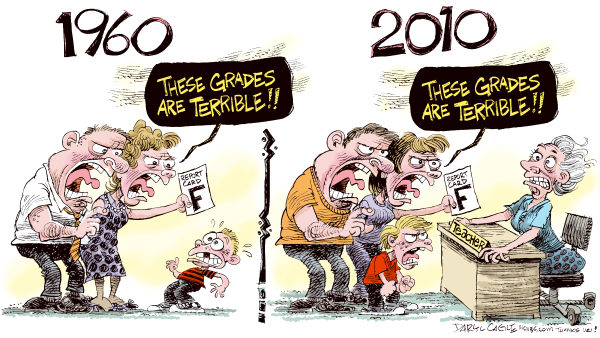
PS Rest assured: I didn't post cartoons with my original letter to OFQUAL!
Being a new teacher can be daunting. To be honest, even when you've taught for many years, a move to a new school can make you feel almost entirely like a beginner again. The nature of teacher is that students listen when they respect you, and rarely before that point. Your job as the teacher is to establish high expectations, behaviour boundaries, and what I used to call "the deal": "You guys work hard, and I'll make your learning worthwhile and engaging".
Behaviour for learning
RandomMaster
As such, the first thing to establish is your behavioural expectations, and I would say it's worth sweating the small stuff. New teachers often say that the added distraction of students using mobile devices is just another discipline headache they don't want to have to deal with, hence they don't go near technology. Personally, I think that if students are misusing technology, what you have is a behaviour problem, not a technology problem, and it should be treated as such. A few little routines, however, can make a real difference. Things like "screens off" time while you explain tasks, and insisting on tablets and devices being flat on the desk where you can see them go some way to creating the attention levels and transparency of use that you want. The same goes for acceptable noise levels, no hands up during questioning and creating an atmosphere in which students are allowed to speak without fear of others criticising or interrupting are the bedrock of good classroom dynamics. A couple of really useful little apps I've found are RandomMaster and Too Noisy (really good for Primary classrooms!)
Too Noisy
RandomMaster is a student selection app: Pre-enter the students' names, and it simply randomizes them as necessary, in front of their eyes on the AppleTV, and there's no arguing, and no bloody lollipop sticks! It can be used to put students into groups, pick the student to answer a question at random, and assign roles within groups (Expert, scribe, researcher and so on). Too Noisy is an ambient volume level measurer: You set what is an acceptable level of noise while the class are working independently, and the display will show students when it is getting too loud, without you having to tell them every two minutes. Again, it's simple stuff, but it makes your expectations clear from the off. Amongst the other apps you can use are things like timers to stop some students dominating class discussion, and spinners to assign random questions. A great tool for this is Triptico which, if you've never seen it, gives you loads of little animated apps such as timers, spinners, scorers, task selectors, word magnets for labelling, order sorters, thinklink hexagons (if you're a SOLO Taxonomist, which isn't as creepy as it sounds!) and various different quiz formats. It's absolutely brilliant if you're working on a desktop or laptop or whiteboard, especially as you can run multiple activities on a screen at once (timer, quiz, student selector etc) BUT it's not yet available as a mobile device app, which is a shame for people like me who don't like swapping between devices for tasks in class. As a new teacher, that might not seem like such a big deal, but every moment you spend getting round tech problems is a moment the class can go off-task and off-boil. The fewer of those you have, the better at the start. That said, it's still well worth checking out... Triptico is a nice little link to the next, most important part of teaching: Engagement
Before we start, a caveat: Beware of using technology in and of itself as a "thing". In terms of engaging students, this is short-termism at its worst. The fact that students are using mobile devices does not mean you have their attention. Sometimes it means you have a good deal less of it than you think. And it definitely doesn't necessarily mean they are learning! But it does offer you a huge variety of new worlds to explore from within your classroom. And it's the tasks that you set which will engage students or not. So think carefully.
Fun activities are one way to make learning fun and effective, so use apps like Triptico to make the learning enjoyable.
Differentiation is another key area which mobile technology can help you with if you want to engage all students. It makes it considerably easier to assign students different materials depending on their ability levels. "Flipping the classroom" is something I really rate as a means of differentiating work, and allowing students to work at their own pace (See my post about Flipped Learning here), and technology makes it very easy to distribute these different resources to different students, whether it's over your VLE, through Youtube playlists or web-pages (you can collate these easily on Pinterest for instance), or simply sending out different electronic resources via email. Want to make it flash? Use QR codes or augmented reality apps like Aurasma or Layar.
Getting your students to show their learning in different ways which are more accessible from whatever stage they are at is one of the great uses of technology in teaching. Some students are ultra-bright in certain areas, but can't show their learning in writing yet. It's important that they learn how to write well, but nevertheless, a student can create a brilliant Science report or MFL monologue without being able to write it down, especially if tech is at your side. Try using apps like Explain Everything to allow them to create videos with their own written or verbal commentaries to show you their learning. Tellagami is another lovely little app which allows students who are a bit shy to speak their findings through a cartoon character, with background pictures to illustrate their learning. Or for longer projects which are intended to develop written skills, what about getting your students to create their own interactive books, with video links, hyperlinks, pictures, and even quizzes. Apple's iBooks is a great way to do this, but I tend to go with Creative Book Builder for its simplicity, and the fact that Apple don't get to put a whole stack of obstacles between you and the sharing of your work! (Apple? Proprietary about their software? You jest, I hear you not cry...)
Finally, technology is more than ever about communication, especially with the advent of mobile tech. It gives you the ability as a teacher to bring the outside world in, make the learning relevant to that outside world through face-to-face interactions (Skype, FaceTime, Google hang-outs). Our own Science department did a superb project with NASA last year, communicating weekly over Skype to talk to their experts about global warming, and to help them with aspects of their work. I can't tell you how many sparks were lit by that single project, but the students still talk about it today.
And it's not just about bringing the outside world into your classroom: It's as much about getting the work of your students out there. Primary schools are now getting their students to blog their learning to other schools internationally, and forging international relationships with other students. Blogger is free, it's connected to a Google e-mail account, and it's easy enough for a monkey to use, as the last 500 words should easily attest. My own personal ambition for my film students is for their work to be known before they even leave our school. We formed the Finham Film-Makers Society, we set up a dedicated Youtube playlist from the department channel, and already the students are starting to gain the sort of exposure they will need to succeed in a competitive business. Can you imagine doing that ten years ago?
Before we end though, a second caveat. Once your use of technology is confident, re-appraise what you're doing in the light of the most crucial question: How far does this enhance learning? Are you using technology and time to create resources which are having no impact on learning? Have a look at the SAMR model below, and if you think you're just substituting stuff, take a step back. Either re-think what you're doing, or give it up. Life's too short to spend time on tasks which don't benefit your students. Re-formulate your task in the light of what you want students to learn, and you'll soon start to work your way up the ladder.
The SAMR model: How transformative is your practice?
I could write another whole section down here on another of the most important aspects of good teaching and learning, which is Assessment for learning. But you know what? You've probably had enough reading for the day. Conscientious blog-readers such as your good selves will probably have a stack of other (far more interesting and erudite!) blogs to be getting on with, so we can cover Socrative, GoogleDocs, and all those delights at a later stage. We could even set it for homework. Let's go crazy. In the meantime, for those of you just starting out, I wish you all the best. It's a great profession.
As an advocate of BYOD, I've always talked to colleagues about the benefits of different devices and approaches within a "mixed economy" digital learning space (or "classroom where everyone's phone is different, as it's more commonly known). Largely, what you want to do should dictate the type of device you use, and I'm quite happy to work in a multi-device environment. Until I walk into my Media classroom.
I should make it clear that I have no particular beef with any other individual device, or operating system, or anything else at which you think I may be showing signs of beefage. But the iPad has always been, and remains for the moment, the device with the most power in terms of Media and Film teaching. Think about it in terms of the skills you are trying to teach, and you'll see why:
Analysis Skills
Analysis is about note-taking, acquiring knowledge, and applying that knowledge in such a way as to develop critical faculties. This is one area of Media and Film Studies which might be considered "device-neutral" (bear with me here, we're in a new digital environment, and there will plenty more neologisms before the blog is out!). For note-taking, I use Evernote, with its easy-to-use UI, easy sharing, tagging and cataloging, and the ease with which I can record verbal feedback as audio attachments to notes. For formal written work, there's GoogleDocs, with comments, editing, sharing, peer feedback and revision checker facilities (I've written about these here, so forgive me for skimming). We do a lot of mind-mapping through Popplet, we use Notability to distribute, annotate and save PDF resources, and we use Explain Everything amongst others to offer different ways of showing learning. So far, so uncontroversial in BYOD terms. I don't think there is an app there which isn't multi-platform, and that's part of the reason I use them, because the students can get used to them in my lesson, and transfer those skills to their other lessons where a variety of different devices are in use.
Resources and curation
Similarly, in terms of resource curation, there are a host of ways of bringing information together for your students into one place which again should be accessible on whichever platform you want. Except Blackberry. There's always a kid with a Blackberry. And they're always the ones who can't access ANYTHING! I digress, somewhat bitterly... Youtube is where all my video tutorials go (might just have blogged about that before as well), Pinterest is the magpie nest where I collate all of the useful and/or shiny things I find on the web, and if you don't already have a VLE to centralise all of this stuff at your school and distribute it to your students, you could do worse than Edmodo, an excellent all-rounder which has been made to mimic Facebook in an "acceptable to all teenagers" sort of a way.
Revision
Finally, for revision, there are a couple of nice apps called Revise Media Studies and Revise Film Studies which are, somewhat predictably if you've gathered the gist of this blog so far, also available on iTunes and Google. They're both pretty good for vocabulary learning, though if you want your students to learn specific definitions of yours, why not get them to make their own flashcard sets with Quizlet? It matches definitions to key terms, and has lots of useful games for testing, and it's available... You guessed it. Here's one I made earlier, Ã la Blue Peter. Or was it Jamie Oliver? Always get those two mixed up.
Practical Media
Practical Media and film production are the areas where Google struggles to keep up with the vast breadth of the Apple app ecosystem, and where Windows are, well, the less said the better frankly. Here, iTunes seems to have a plethora of simple tutorial apps available for Film which show you the basics of filming and editing, such as Making Movies Make Sense and for the more advanced students, the more in-depth CLOSE-UP, an app of advanced film vocabulary which is really useful, with a variety of checklists for commenting on different elements of film making. For example, the checklist for Lighting includes sliders between low and high-key, high and low contrast, soft and hard light, as well as options for shadows, composition and light sources. Developers just seem to think that their most lucrative education market will be Apple users, and thus they write first for iTunes. Some stop at that, others get a Google app up and going soon afterwards, but that, I think, is why Apple are currently still ahead of the game.
CeltX in action
Film Scripting
One of my favourite simple apps for creating scripts of any kind (theatre, radio, TV, film) is CeltX, and the iPad app is excellent for this. The app formats scripts exactly as they would be presented professionally, and prompts you for slug-lines, actions, character names, dialogue, parentheses, camera angles et al. When you write in what you want, the app automatically formats the information as it would be in a script. Character information is in capitals and centred, for example, whereas dialogue is indented appropriately. A free account means you can access any of your scripts in the cloud, via the desktop app, the iPad app, or the online editor. Simple, brilliant. Available on Google, but not as crisp or easy to use for some reason. No idea why.
Storyboarding
Cinemek: Why can't the kids ever pronounce it?!
Storyboarding is one of the film-maker's key tools. There are a shedload of storyboarding apps out there, but the one I love most is Cinemek, because it uses photos taken on the device you are working on, and incorporates them into the storyboard frames. That seems like a faff to some students, because they want to draw something quickly and get on with filming. But the beauty of needing to take photos is that students need to think beyond showing the story events: They need to work out where they are shooting it from, what angle is best, the distance of the camera from the subject etc. And all of this gets them into the swing of thinking of the film product not simply as a story-showing device, but as a means of artistic expression in itself. And while the camera shooting gets them thinking about framing, the storyboard itself gets them to think about timing (they can change the duration of each frame), about camera movement (they can insert track and zoom symbols), about how the script and the visuals go together, and finally they can even play back a quick video to show them how the storyboard looks in motion. Awesomeness.
Filming
If you're a "real" film or media teacher, the iPad filming solution isn't a satisfactory one, but filming on an iPad certainly gives you an idea of pre-viz, and at lower ability levels or for younger age groups, it offers a lot of practical skills if you combine iPad filming with iMovie editing (especially good for its trailer templates) and / or Pinnacle Studio: The two have different functions, but are becoming much of a muchness (speed up, slow down, titles, images, sound effects etc). It's now also possible to get a bit better quality of sound and stability with Mic attachments (such as the iRig system, for use with proper microphones) and tripods designed deliberately for use with iPads. You can even control a multicamera shoot with the Collabracam app and if you want to go really nuts, there are basic Green Screen apps, as well as some more fun things like ACTION MOVIE, an app which allows you to ham up your real-life footage with exploding monsters, tumbling cars, you name it. All of these are plenty to exercise the creative minds of young students, and the process and skills are the basics you want them to learn for later on in their Media and film careers, from pre- to post-production, just a bit simpler.
Print
There are oodles of photo editing apps out there too, many of which do some neat things (Snapseed, Filterstorm, PS Express to name but a few), but few of them seem to do everything you want. For some reason, the apps which alter photos don't do good layout design, and the apps which do good layout aren't great for image editing. Personally I go with PS Touch for combining posters and images, and working with layers especially. There are standard Photoshop tools such as selection, magic wand, painting, cloning and blurring tools, as well as adjustment tools, a load of preset styles and effects, text, fill, gradient, lens flare... You get the idea. There's a lot of stuff. PS Touch makes them savable and they can then be used in other apps from the camera roll. However, having praised it to the heavens for its functionality, I should warn you that the functionality is inversely proportional to its usability! Get your degree first, then try to work out how to use it...
Quark Design Pad
For bringing the whole thing together, QuarkDesign Pad allows you to create full design products which are exportable as PDF and PNG. We use Adobe InDesign with A-level students, but this is pretty good as a cut-down version. The app allows you to place boxes, designated them as text or image or background, give them shape and outlines and colour / opacity properties. And unlike PS Touch, the interface is a lot more intuitive. Between the two of them, you can get some pretty fancy print work going.
Web
There are tonnes of app design and webpage design tools out there to choose from, and I'd be loathe to name one over another, because their suitability will depend largely on your proficiency level and the quality and key functions of what you want to achieve. You can easily knock up something from templates with apps such as Simpl easy website builder. On the other hand, if you want to build from scratch and have something which is CSS editable, you could go for something like i-Dzign Web Page Builder, with its easy WYSIWYG interface, ability to save in a variety of formats, and also the ability to publish via an in app FTP client.
And there you have it. An almost complete tool-kit for Media and Film teachers, all on one portable (beautifully designed and premium-priced) device. Get a class set. Get an AppleTV to show everyone's work, and Robert's your father's brother and other such old-fashioned witticisms.
Enjoy.
One of the most important factors in moving forward towards a roll-out of any form of mobile learning school, whether it be iPad 1:1, or BYOD in our case, is getting teachers, students and parents on board with the process simultaneously. Try shooting five basketballs towards a basket at the same time: It's more or less the same exercise. Or planning, teaching, marking, answering a thousand e-mail requests for paperwork and having any sort of life outside of school, for that matter.
I've dealt elsewhere with our general strategy and rationale for the roll-out , and looked specifically at the issues of staff training, student engagement in the process and the part played by Digital Leaders in this process, so forgive me if I don't revisit old ground here. We developed our strategy, worked out how we could train teachers gradually, and interviewed and trained our Digital Leaders to help us with our class trials. But now the big step to a whole-school roll-out looms, and we really need to get ALL of our parents on-board, or they won't allow their students to bring their devices in in the first place.
These are the key points we need to communicate to them, in my opinion:
They need to understand that this is not a gimmick to engage students: There is a clear educational rationale behind the move, which we consider will help improve the performance of our students on a long-term basis. In other words, they have to understand that our move is fundamentally about teaching and learning, and that the use of mobile devices in lesson will occur when there is a clear way in which it can augment, modify or redefine the learning in that lesson, and not otherwise.
They need to understand why we have decided not to specify a particular device (often iPads in these types of schemes), or indeed pay for the roll-out ourselves from school funds. Essentially there are two key reasons for this move, which are economic and pedagogical. Economically, we as a school cannot afford to pay for them ourselves (£70000 every three years?), and if we passed the cost on to the parents, many of them may not be able to afford it either, especially in times of recession, economic insecurity etc. So not only are we saving ourselves money (three more teachers potentially to help their students?), we are also saving them money, as 99.6% of our students already own devices which they probably bring in to school on a daily basis. Pedagogically, much as I am a fan of the iPad itself, I can't pretend that other devices are not catching them up quickly. Each new iPad seems less of an education game-changer than the last, and yet the premium is still charged. More importantly, I think there is real benefit to be had from giving students and parents the choice of what to bring in, and getting them to discuss issues of what each phone/tablet can and cannot do in the context of teaching and learning, rather than mere functionality (my graphics card is faster and bigger than yours, sort of thing).
We as a school need to address insurance worries head on: Many parents could quite reasonably object to their children being asked to bring mobile devices into school on the grounds that they could get damaged or stolen. But what if they currently allow their child to bring their phone into school at the moment? Then there is no change in the situation. The phones can still be insured as part of household contents insurance or, as many people already do, can be insured as discrete devices. Having said that, we as a school do also need to make it as secure an environment as possible for our students to bring their phones and devices to school safely. That means addressing potential areas where students might have to leave their devices unattended (changing rooms for instance), and ensuring that we are vigilant at all times, and have water-tight security systems in place to protect student property. To my mind, we should be doing that already. Similarly, in this new digital learning environment, we as a school ought to be pressing the insurance industry for easy, cheap and viable schemes which will allow us to protect our students' devices without costing the earth. Already, some financial institutions are beginning to respond to these requirements.
Finally, I think it is imperative that parents can SEE the enhanced learning which occurs as a result of using mobile devices. They need to see it in action: We should be inviting them to watch model lessons with students, with a debrief showing how it has enhanced the learning, the students' organisation, their motivation and the differentiation which devices can enable. They need to see these enhancements to lessons in order to understand just how much difference mobile learning can make to their child's education. If we can accompany these sessions with Q&A at the end, with both the teacher and the students involved, (as happened here when I taught a lesson in front of colleagues from across the city using the same techniques as part of a rolling programme of CPD observations "for real"), then I think parents will be a lot more positive about the use of mobile technology as an integral part of their child's learning experience.
My ideal way of organising this would be as follows: A festival of mobile learning. As part of this, the school would perhaps need to be open a day at a weekend (and perhaps have a day off as recompense?), and invite parents and members of the local community in to see a variety of activities in action. We would have different subjects running workshops on some of the ways in which they use mobile technology as part of teaching and learning and explaining how it works in an open session for all students and parents. We would also have several "show" lessons occurring simultaneously which parents could visit, look at the teaching, look at the types of activities students were undertaking, and talk to both students and teachers about how exactly the mobile devices are enhancing teaching and learning. You could even invite local companies connected with mobile devices and mobile learning to come in and sponsor the event, and use it to pitch the benefits of their products to parents, showing them the possibilities.
A fundamental building block of this strategy would be the involvement of students who already use mobile learning, and Digital Leaders in particular. Alongside the teacher-led workshops and model lessons, the student leaders could lead "Genius bar" style sessions including videos of other lessons throughout the year, the students' own thoughts on mobile learning, and the advantages it gives them over other learners. They would be able to show how they themselves support the process in school, answer technical queries, and could also talk to parents knowledgeably about the different sorts of devices they have used, the advantages and disadvantages of each for different subjects, and they could blog about this afterwards so that this advice is permanently there for parents to refer to, with direct links from the school website.
One of the other things this type of festival would facilitate is for other teachers who are less confident about tech use in lessons (from other schools, or from within our own) to get the same information, to interrogate the possibilities for themselves, and to make their own first steps. This would be great CPD for all involved, sharing best and next practice widely, and also enabling schools like ours to clearly demonstrate our role as a support school to those in the wider community. In fact, I think it would be great to follow this up with an hour's TeachMeet at the end of the day for teachers to share their best apps and resources, divided into different categories (AFL, BFL, differentiation and personalisation, etc), so teachers can get what they want out of it. That would act as a great summary of everything which has been shared that day, and really send people away with lots to think about.
After an event like that, I think very few parents will be in any doubt about the school's rationale for using mobile devices to enhance learning, and I would hope that teachers and students would be enthused, and that the wider community would be able to see just what a forward-thinking institution this was...
If we don't engage parents, and show them the realities of modern education, and the potential mobile technology brings within that environment, we risk them not understanding what we are trying to do, and we all know where that leads...
Yesterday I ran a revision session as I often do for my students before their A level exams kick in. Usually it's a fairly dry affair, what-do-you-know, what-don't-you-know (with raised eyebrows hinting at the "and why don't you know it yet?"-ness of the latter). It's never really something I've got my head round how to do well. There must be an answer, but I'm damned if I ever found it. This year, inspired by a particularly brilliant NQT in the department, I decided to try and do things differently. Apparently, according to the students, it was brilliant. This is what we did...
First, I stopped assuming the student know HOW to revise. We went right back to basics, getting them to think about their state of health as they approach their revision tasks.
We talked about getting the body fit every day: Fit body = oxygenated brain = more effective learning
We talked about the importance of good sleep patterns, getting early nights, and switching off well before they went to bed. Most of them seemed to have no idea that being plugged in to the telly, the computer, Facebook etc just before bed meant their brains were still free-wheeling for a good while after they stopped.
We talked about the importance of fuel: Eating a balanced diet, with plenty of vegetables and fruit, and complex carbohydrates for slow release of energy. We talked about eating little and often while you revise so that your body isn't sluggishly dividing its energies between the brain and the digestion. We talked about water to hydrate the brain.
We talked about the quick energy releases of caffeine and sugar and sweets, and how the come-down is worse than the temporary benefits gained, and leads to lack of focus.
We talked about deep breathing to oxygenate the brain: We started with three deep in breaths, and we showed them that deep breathing is in the diaphragm, not the chest. We let those three deep breaths out as slowly as possible (record was 40 secs for one constant out-breath - pretty impressive). We followed this with three deep in breaths and let them out as forcefully and quickly as possible. They could feel more awareness, more focus (and at nine in the morning, more awake than most of them had felt all year apparently!). We explained about the importance of oxygenating the blood and the brain for peak performance.
After a while they started to see that we were in training: We were athletes, in it for the long haul, and we needed to get ourselves ready.
Next we looked at the environment for revision: Getting rid of anything extraneous, anything on the desk apart from what is required. We looked at creating an environment which isn't comfortable, on the basis that comfy and cozy equals sleepy. So the whole session was conducting without sitting down at all during the active bits, with fresh air through open windows so it wasn't too warm to concentrate, and we did the whole session in music-less silence, apart from our own discussions.
And finally we talked about sucking lemons. Old trick I think my Dad taught me before my A levels: Sets the teeth on edge, horrible taste, but my lord does it concentrate the mind!
Apparently, nobody had ever spoken to our students about this stuff, about how to get yourself in optimal condition to learn. That surprised me, but I liked the way they responded to being treated more like Olympic athletes than teaching fodder. Their response was excellent, and they really seemed to get a lot more out of it that other revision sessions they'd done.
The important bit for me was that we not only thought about these things, but we modeled them during the session: We had water stations for everyone and herbal tea if they wanted; We provided complex carbohydrate (sugar-free) flapjacks and bananas, and we kept them standing for the 25 minute sessions in a relatively cool classroom.
Lastly, before we got onto the material itself, we talked about what time of day their bodies and brains work best. We thought about timing, and what your brain can hold at any one time: We discussed working 3 hours a day, beginning early in the day. Morning is always better to get revision out of the way, and it gives them the rest of the day to look forward to, with the sense of achievement and the feel-good factor that goes with it. We talked about never revising for more than 20-25 minutes at a time, and being strictly disciplined with five minute breaks in between: Not over-eating. Rehydrating. Re-energising through breathing before the next session. And no more than 6-8 sessions in a day. And we talked about reflecting on what they'd learnt before they ended each 20-25 minute session, to increase likely retention of material. We talked about maximising this with one session reviewing this revision either later that day - 20 minutes or so - or perhaps first thing the following morning.
And finally we talked about resting and relaxing after the work is done. If they're disciplined, and they've stuck to their schedule, they've earned it as far as I'm concerned.
Oddly enough, this was probably the most important bit of the day for the students, according to the feedback we got. The whole motivation industry is well and truly established within education, but many of the students complained that once Mr Motivator had pumped them up and buggered off, they didn't necessarily know how to set about their task. This gave them an idea of what needed to be done on a daily basis in order to achieve those long-term goals, and they seemed to appreciate that help.
The rest of the sessions were dealing with particular skills and content important to my subject. We worked out how much there was to revise, how often we'd need to review each topic before the exam, and created the revision timetable we needed as a roadmap for the journey. Then we thought about the revision tasks themselves: We talked about summarising content, synthesising ideas and finding links, mind-mapping topics, applying ideas and theories to examples, practising exam tasks, but above we made it clear: NEVER simply read through notes! Revise actively, with colours, different layouts, mind maps etc, but don't just sit down. That way lies death and boredom... Or at least poor results.
And there you have it. It looks like there was no magic bullet all along. It's all just a matter of teaching the students to be aware of how they learn optimally. We'll see if it worked on results day...
ADDENDUM: If by any chance there is a magic bullet, and you've found it, please share it. I'm still curious.
It's been a while since I've blogged with the pressure of impending OFSTED, marking every single word every written by any student to please the new guidelines etc etc, but today I learned something new about GoogleDocs. And it's worth sharing. I thought so, anyway...
Context: I was presenting at Coventry's Partnership Plus Teaching Conference today about the way in which mobile devices could help teachers improve teaching and learning. Initially I had divided the talk into three sections: Assessment for Learning through questioning, differentiation and fostering independence in students. As a last minute addition (and by last-minute I mean at 4.22 a.m. before the 9.00 start!), I thought I ought to include marking and feedback as OFSTED seem to be putting a great deal of onus on those aspects of teaching and learning.
As many of you know I use GoogleDocs and Evernote constantly for formal written work.
EVERNOTE
The students use Evernote as their note-taking tool first and foremost:
It's easy to use
It can include all sorts of other media (videos of a practical, photos of notes on a board, attached documents you send the students etc)
Documents are easily shareable, through email, link sharing, or on Twitter
Notes are taggable for easy cross-referencing (especially useful when it comes to revision of topics)
And most importantly from my point of view, for verbal feedback
Use the mic (top right) to record a verbal feedback file (bottom left)
Let me explain the last point, as it saves a lot of wasted time. It seems to me that the new focus on marking and feedback is leaving many schools floundering in a tidal wave of evidence searching, to prove that we do what we do every day, namely talk to our students. In our school it's "Verbal feedback given" stamps. In other schools, there will be some variation on that theme. And for the sentences or two of advice I give, the whole rigmarole of getting a stamp out, getting students to mark in books what has been written etc is precious time being wasted, which often takes longer than what I'm asking them to action. So here is where Evernote comes in useful: You simply record yourself as you talk to the student, and an audio recording is automatically appended to their notes. It's simple, it's no extra work, it's evidence that I do it, and it's there when ten minutes later the student is about to ask me for the fifth time what I said!
GOOGLE DOCS
For more formal assessed writing, I use GoogleDocs (for presentations, essays, spreadsheets, forms etc). There are several areas of functionality that Docs has which are easier to access than in Evernote, as follows:
Collaborative writing is easily done by students sharing the link to the document they are creating with whoever else they wish to work with. This is useful for collaborative classwork and homework. It is also incredibly easy for me as a marker to see who has contributed what sections of each document, and therefore to distinguish between their input levels, and justify different marks to examiners.
Peer feedback is easy through the comments section, again simply through sharing the link to the document with a given peer. In particular I like the fact that the person sharing the document can set preferences so that they control whether collaborators and peers can view, comment upon or actually edit a document
Sharing documents with me as a teacher creates a system of visible, trackable marking, the "paper trail" OFSTED are often looking for. All comments are dated, and each different collaborator's comments, including mine, come in different colours.
Comments added down the right
This then begins a mythical and trackable dialogue with students, through which we can start the processes of DIRT, reflection or whatever you wish to call it. And again, it's very visible.
MARK SUPPORT COMMENTS FOR MODERATORS
Throughout the process of drafting, marking and re-drafting work, the student has a record of everything that has been said, and the teacher has a record of everything which has been changed, which I think is pretty neat. But someone was about to help me out even further with some learning of my own. During the conference today one colleague stopped me short and asked if we could print out the document with the teacher comments on, as she wanted to write to send her work off to the moderator with her comments typed in the margin. Great idea, I thought, before investigating and finding out it wasn't possible (Google, if you're listening, sort it out!). Another colleague however, reminded us you can export documents as a variety of formats including Word. And lo and behold, when you do, there are all the comments!
Comments to support marks down the right, including those of internal moderators in different colours
So there you have it: Today's revelation. Use GoogleDocs not just to annotate for your students, but also do it for your external moderation: If you cross-moderate within departments, it's even better as the internal moderator's comments are in a different colour. Export the document as a Word document, and print. Job done!
My workshop, but it was me who was learning as much as anyone there. I do love it when teachers share...